
Apps reach a Beroun device as signed packages. The catalog checks and signs them; the system checks them again, file by file, installs beside the old copy and puts the old state back on any failure. Owners see in plain words what an app asks for before they install it.
The pieces
| Piece | Role |
|---|---|
| Catalog and arbiter | Receives packages, checks them, signs at approval, and serves the catalog for platform beroun |
| System side | appinstall and the store routes of the shell: download, verify, install, update, remove with rollback |
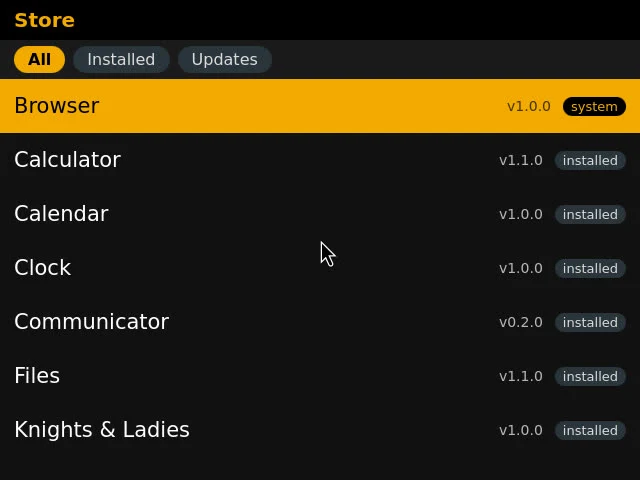
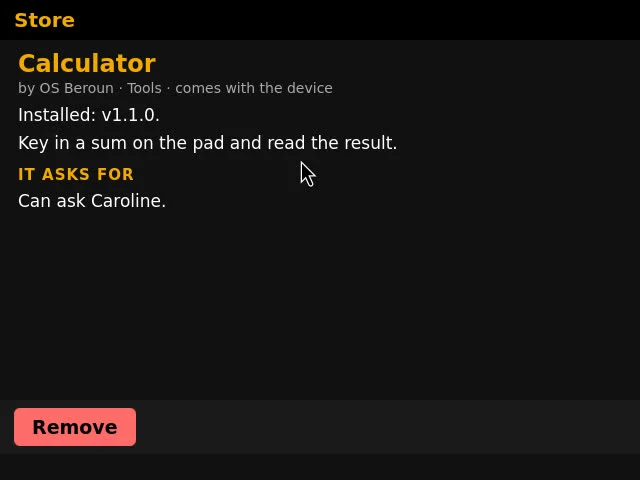
| The Store app | A system app with the permission apps.manage: lists All, Installed, Updates, shows a card with what the app asks for, and installs, updates or removes |
| Packaging tools | Scripts that build packages from a commit and publish them |
A package
A zip: the app folder with manifest.json at the root, plus a sign.list added by the arbiter at approval.
The arbiter's key is made once by the operator. Its public half is built into the system, so a device accepts nothing else.
Package rules
Checked by the arbiter, and again by the system on the device:
- Format 1, and the
berounfield (the lowest OS version) is required. - No
nativeprograms; no.so,.dll, ELF, PE or Mach-O files;python3is the only program a service may run. moduleandprivilegedservices are refused. Service ports are 49000–49999.- No links and no
..; size limits apply. - The only permission is
caroline.ask. systemmust match whether the id is a system app, and only a platform admin may publish one.requiredcapabilities are checked against the device. A device offers Notification, FileStorage, Network, Microphone and ExternalDisplay.
Install, update, remove
- Install and update:
POST /api/store/install {"app": "<id>"}. The app is on the launcher at once. Its services, endpoints, agents, permissions, big page and Caroline's tools appear without a restart, and return at start. - Remove: a store app is closed, its services stop, everything it registered is undone, and its folder, data and saved place are deleted. Files it wrote to the memory card stay.
- Preinstalled apps are hidden when removed and keep their data. Installing one again restores it from the system without a download. System apps are only updated.
- Automatic updates: the setting
auto_update(on by default). A minute after start and every six hours the shell installs waiting updates, except one that asks for more rights than the installed version, or whose app is open. A notification names each one, and the Store tile shows a badge with their number.
| Error | Status |
|---|---|
offline | 502 |
not-found, not-installed | 404 |
system | 403 |
conflict, not-higher, missing-capability | 409 |
bad-signature | 422 |
no-key | 503 |
Only the Store's page and Caroline may call /api/store/*.
Publishing
To ship a new version of an app: raise version in the manifest, commit, build the package from that commit (never from the working tree), and publish it. The packager adds the beroun field if it is missing, writes <id>-<version>.zip with a listing (name, description, category, icon), and refuses a package that breaks the rules. A version that is already published is refused.
Music, Video, Calculator, Notepad, Files, Communicator, the three games, Settings and Wi-Fi are published at the system's own versions. Apps with native parts or system-owned ports (Browser, Calendar, Clock, Ratatosk, Store) ship with the system.
Versions
- The OS version appears in Settings > About and
GET /api/about. Apps state the minimum OS they need inberoun; one that needs a newer OS than the device has is refused. - Pinned Weston and WPE versions are the contract a system image follows.
- Caroline reaches every device through her own signed release for platform
beroun(see Caroline).